How to Track OpenAI Codex Token Usage
OpenAI Codex shows you how much of your subscription you have used. What it does not show is how many tokens that actually is.
"70 % consumed" could mean 300,000 tokens or 3,000,000 tokens. The difference matters when you are budgeting a multi-file refactor or comparing Codex against Claude Code on the same task.
This guide shows how TokenBBQ turns Codex's percentage into real, absolute numbers you can act on.
1. What Codex Shows You Today
Codex has a built-in status command you can run inside the CLI:
/status— shows your current subscription tier usage as a percentage
This is useful for a quick check, but it has limits:
- It shows only a percentage, not absolute token counts
- It does not show input versus output tokens separately
- It does not track usage across multiple Codex sessions or other AI tools
The OpenAI Usage Dashboard gives you account-level totals, but it updates with a delay and does not split by tool or project.
2. How Codex Differs from Claude Code
Codex and Claude Code have different token profiles, which affects what you see in TokenBBQ:
- Codex often reads selected context through tool calls instead of loading every file at once. The exact token profile depends on the prompt, model, and run mode.
- Codex can chain tool calls, so long agent runs may accumulate input, output, cached input, and reasoning tokens quickly.
- Codex exposes run controls such as
--model,--ask-for-approval,--sandbox, and reasoning effort settings, depending on the installed CLI version.
3. What TokenBBQ Adds
TokenBBQ reads the logs that Codex already writes to your machine and turns them into a dashboard. No proxy, no network interception, no code changes.
| What you get | Codex native | With TokenBBQ |
|---|---|---|
| Absolute token count | No — percentages only | Yes — input + output |
| Cross-session daily total | No | Yes — auto-aggregated |
| Multi-tool comparison | No — only Codex | Yes — Codex, Claude, Gemini, etc. |
| Live dashboard | No | Yes — browser + CLI |
| Project-level split | No | Yes — by working directory |
4. How TokenBBQ Works
TokenBBQ reads the log files that Codex writes locally. It extracts token counts, timestamps, and model information, then serves them in two forms:
- Web dashboard — open in your browser, auto-refreshes every 5 seconds
- Terminal output —
npx tokenbbq daily,npx tokenbbq monthly,npx tokenbbq summary, or--json
Everything stays on your machine. The only network request TokenBBQ makes is to fetch current API pricing from LiteLLM so cost estimates stay accurate.
5. Quick Start
No install, no config, no API key:
npx tokenbbq@latestThis starts the web dashboard on http://localhost:3000. Run Codex as usual. TokenBBQ picks up the log data automatically.
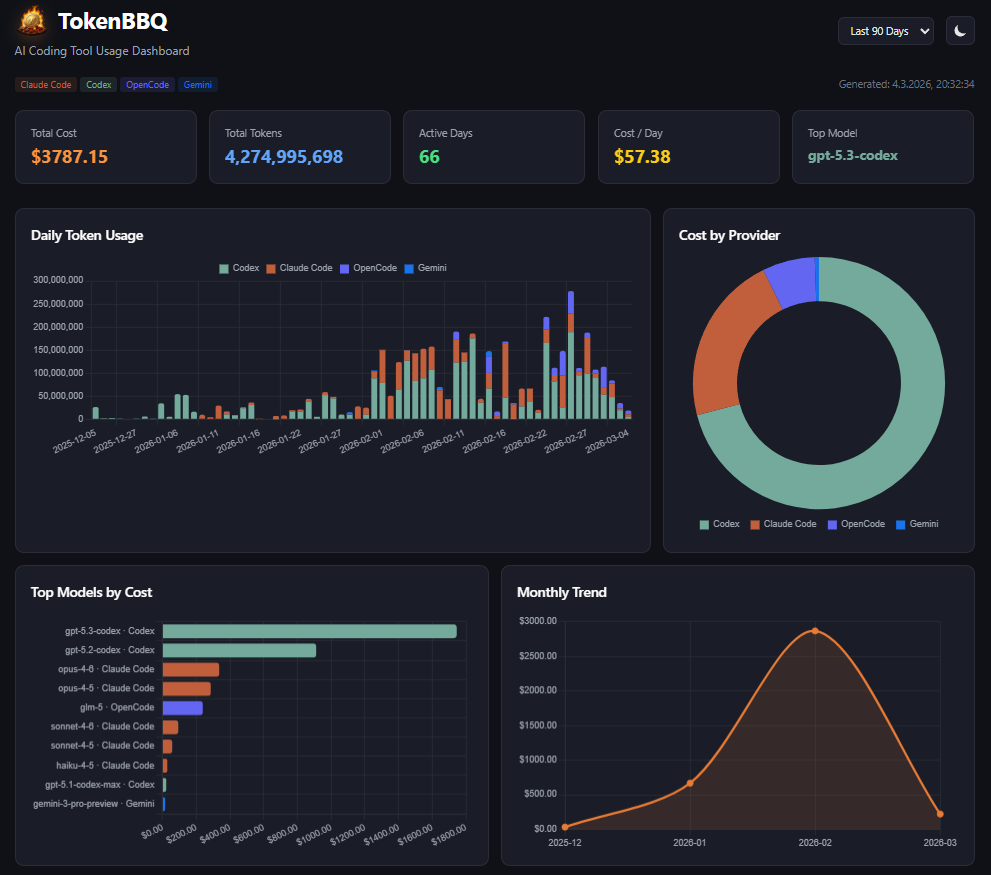
For terminal-only output:
npx tokenbbq@latest daily
npx tokenbbq@latest monthly
npx tokenbbq@latest summary --json
6. About the Desktop Pill
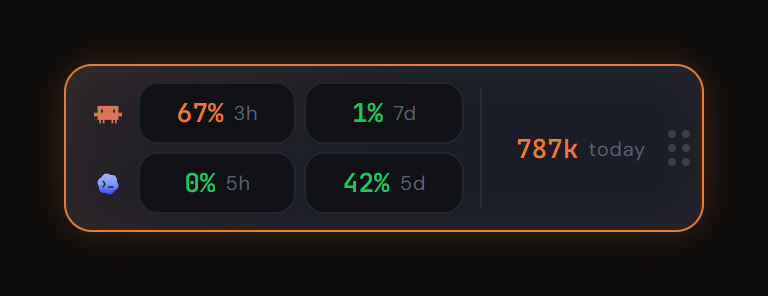
TokenBBQ also offers a separate desktop widget — the Pill — that floats above your IDE and shows subscription usage at a glance.
- Codex subscription fill (Primary and Secondary window with reset time)
- Tokens consumed today from all local AI tools
- Toggle to switch the Pill between Codex and Claude Code view
The Pill is a separate desktop app with its own installer. It is not part of npx tokenbbq. One click on the Pill opens the full dashboard.
7. What the Numbers Mean
TokenBBQ shows three metrics for Codex:
- Input tokens — your code, prompts, and context sent to Codex
- Output tokens — Codex's responses, diffs, and explanations
- Estimated cost — based on OpenAI's published pricing per model tier
The cost estimate is not official billing. It is a quick sanity check based on current API rates.
8. Comparing Codex and Claude Code
TokenBBQ tracks both, so you can compare:
- OpenAI Codex — selected-context, tool-driven runs can be efficient for quick refactors, and controls such as
--model,--ask-for-approval, and--sandboxlet you tune behavior. - Claude Code — often explores broader project context; TokenBBQ shows the actual usage instead of guessing from the tool name.
If you are hitting Codex rate limits daily, switching to Claude Code for deep reasoning tasks can keep you productive without upgrading your OpenAI tier. Read the Claude Code token tracking guide for the full setup.
9. Related Guides
- AI Token Tracker — Compare Claude, Codex, Gemini & More — multi-tool comparison in one unified dashboard.
- Track Codex Tokens with Absolute Numbers — convert Codex percentages into real token counts.
- How to Track Claude Code Token Usage — the same setup for the Anthropic side, with the 5-hour and 7-day windows.
- Track AI Token Usage Per Project — split daily Codex costs across multiple repositories or clients.
10. Summary
Codex's native /status command is fine for a quick look at your subscription fill. When you need absolute numbers, cross-session totals, or a view across multiple AI tools, TokenBBQ fills the gap.
Open-source, local-only, no sign-up. Run it once alongside Codex and stop guessing what "70 %" actually means.