Track AI Token Usage Per Project
If you work on multiple projects with AI coding tools, you have probably asked yourself:
- Which repository is burning through my API quota?
- How much did that client project cost me in tokens last week?
- Should I bill project A or project B for the Claude Code session I just ran?
The API dashboards from OpenAI and Anthropic show you one global number. They do not split by codebase. TokenBBQ does.
1. The Problem: One API Key, Many Projects
Here is what a typical provider dashboard shows today:
Total tokens today: 142,000
Total cost today:     $0.87
That is it. No breakdown. No per-project split. No way to know if your side project just ate 80% of your daily budget while your main client work sat idle.
2. Why Per-Project Token Tracking Matters
- Billing accuracy — pass real token costs to clients instead of estimates
- Budget control — see which repository is consuming the quota
- Profitability — see which projects eat more AI time than they earn
- Resource planning — know which repositories need a bigger API tier
- Team transparency — share project-level usage without exposing total account spend
3. What the Big Platforms Give You
| Platform | Project Split? | Real-Time? |
|---|---|---|
| OpenAI Usage Dashboard | No — one global number | Delayed by minutes |
| Anthropic Console | No — per-key only | Delayed by minutes |
| TokenBBQ | Yes — per project | Real-time |
4. Project Tracking in TokenBBQ
TokenBBQ breaks down your token usage by project. The dashboard shows:
- Tokens and cost per project, based on the working directory where your AI tool runs
- Breakdown by day, month, provider, model, and project
- Time filters — 7, 30, 90, 180, or 365 days
- Sortable tables — compare projects side by side
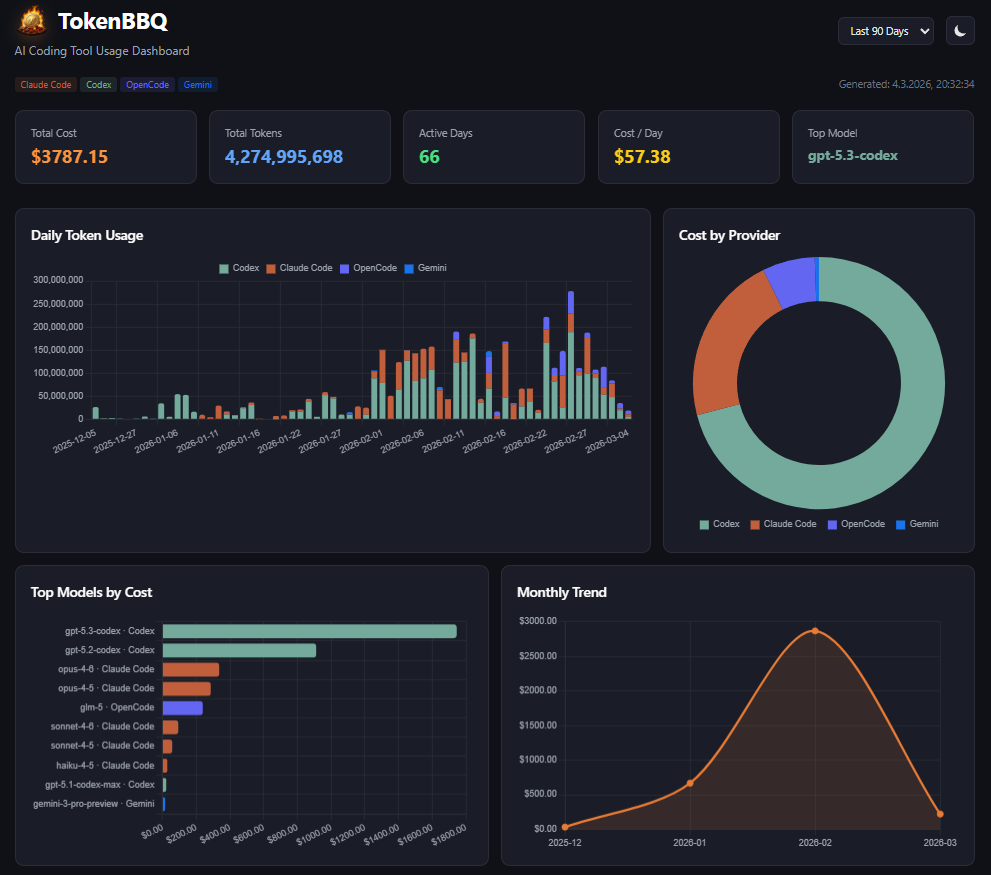
The data comes from the log files that Claude Code, Codex, and other tools already write locally. TokenBBQ reads them and groups by the directory each tool was running in.
5. Quick Start
No install, no config, no API key:
npx tokenbbq@latestThis starts the web dashboard on http://localhost:3000. Run your AI tools from their respective project directories as usual. TokenBBQ picks up the log data and groups it by folder.
For terminal output with project grouping:
npx tokenbbq@latest daily
npx tokenbbq@latest monthly
npx tokenbbq@latest summary --json
6. Use Cases
Freelancer billing
Bill clients for actual AI usage instead of guessing. At the end of the week, check the project breakdown in the dashboard and attach the numbers to your invoice. Transparent, fair, and defensible.
Team budget management
A team of five developers shares one company API key. TokenBBQ shows which repository is consuming the quota. If the marketing site bot eats 60% of the budget, you know where to optimize.
Side-project discipline
Your main job pays the API bill, but your side project is where the fun is. Set a mental cap for the side project. TokenBBQ shows the daily numbers per project — so your hobby does not eat the quota meant for client work.
7. Related Guides
- How to Track Claude Code Token Usage — absolute token numbers for Claude Code, with the 5-hour and 7-day windows.
- How to Track OpenAI Codex Token Usage — the same for Codex, plus a Codex-vs-Claude comparison table.
8. Summary
OpenAI and Anthropic give you a single total. TokenBBQ splits it by project.
If you run AI coding tools across multiple repositories, you need project-level tracking. It is the difference between guessing your costs and knowing them.