
v0.3.0 — Available on npm

One Dashboard All Coding Agents Zero Guesswork

TokenBBQ reads the usage data your AI tools already store on your machine and shows you exactly what Claude Code, Codex, Gemini, OpenCode, Amp, and Pi-Agent are costing you.

npx tokenbbq@latest
Zero config Runs locally MIT license No API keys
Claude Code Codex Gemini OpenCode Amp Pi-Agent
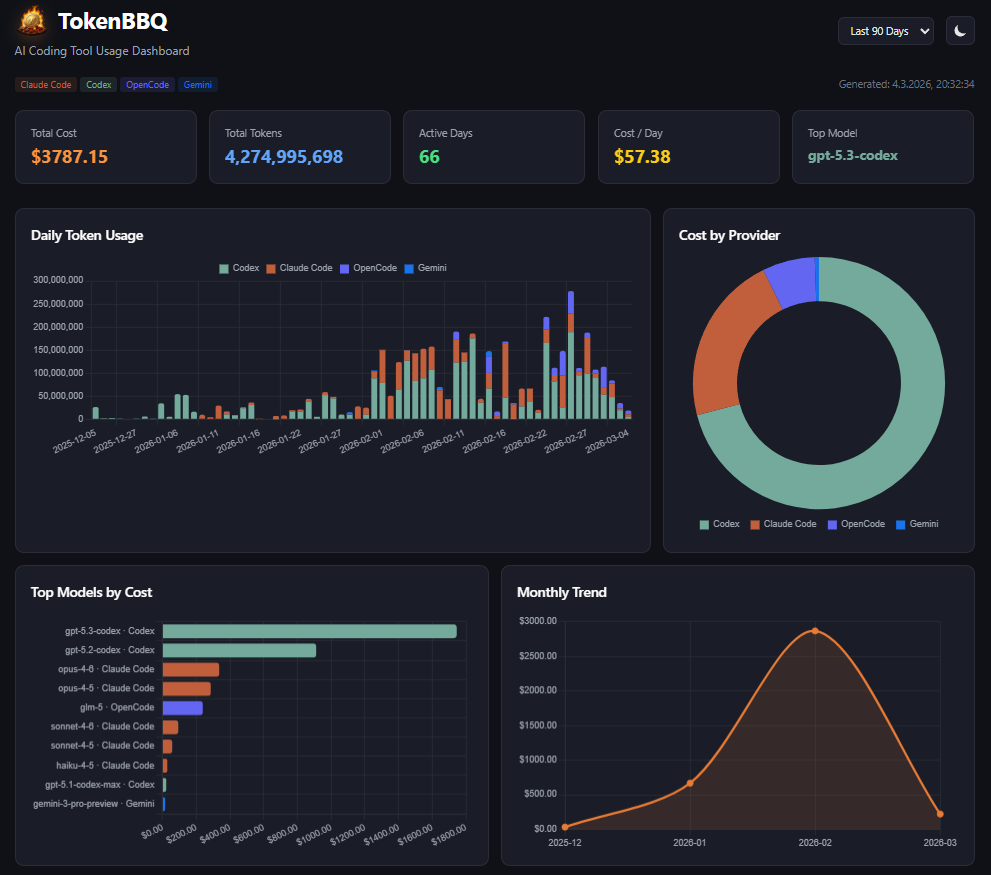
TokenBBQ Dashboard

Three steps from zero to insight

No config files, no accounts, no dashboards to sign up for. Your AI tools already collected the data — TokenBBQ just shows it to you.

Run one command

No install needed. npx pulls the latest version and runs immediately. No config files, no environment variables, no setup.

$ npx tokenbbq@latest

TokenBBQ scans your data

Automatically finds the usage logs your AI tools store on your machine. Parses them and fetches current model pricing from LiteLLM.

Dashboard opens locally

A local web dashboard opens at localhost:3000 with charts, cost breakdowns, and usage trends. Nothing is sent anywhere.

localhost:3000

Every angle on your AI spend

Every angle on your token usage — now with dark & light mode, time filters, sortable tables, expandable rows, and auto-refresh. Built for developers who want actual data, not just totals.

Daily Cost Timeline

Daily token usage stacked by provider. Spot billing spikes before they show up on your statement.

Provider Cost Breakdown

Donut chart showing exact cost split across all your coding agents. Know which tool is eating your budget.

Top Models Ranking

Top 10 models ranked by total cost. Know exactly which model is most expensive across all your tools.

Monthly Spending Trend

Month-over-month chart. Track whether your AI costs are climbing, stable, or dropping.

Activity Heatmap

GitHub-style 90-day heatmap. See which days you hammered the APIs and find your usage patterns.

Full CLI Output

Terminal tables, JSON export, and a compact summary mode. Every format, every workflow.

Dark & Light Mode

Automatic theme switching, time-range filters, sortable columns, expandable row details, and auto-refresh. A dashboard that adapts to how you work.

All your AI coding tools. One view.

TokenBBQ automatically detects which tools you have installed. If the data exists on your machine, it gets parsed.

Claude Code

~/.claude/projects/**/*.jsonl
Supported

OpenAI Codex

~/.codex/sessions/**/*.jsonl
Supported

Gemini CLI

~/.gemini/tmp/**/chats/session-*.json
New in v0.3.0

OpenCode

~/.local/share/opencode/storage/**/*.json + SQLite
Supported

Amp

~/.local/share/amp/threads/**/*.json
Supported

Pi-Agent

~/.pi/agent/sessions/**/*.jsonl
Supported

Your data stays on your machine

Your AI tool logs contain code context, session data, and project names. TokenBBQ never sends any of it anywhere.

All data stays local

Reads files on your filesystem, serves a dashboard on localhost. The only external request is fetching model pricing from LiteLLM — your usage data never moves.

No accounts, no keys

Nothing to sign up for. No API keys, no environment variables, no authentication. Run it, see your data, close it.

MIT licensed

The entire codebase is on GitHub. Read it, audit it, fork it. Don't trust any tool you can't inspect.

More than just a dashboard

Terminal tables, JSON export, and a quick summary mode. Use it interactively or pipe it into scripts.

$npx tokenbbq# Open dashboard in browser
$npx tokenbbq daily# Daily usage table in terminal
$npx tokenbbq monthly# Monthly breakdown table
$npx tokenbbq summary# Compact stats overview
$npx tokenbbq --json# Export all data as JSON
$npx tokenbbq --port=8080# Custom port

See where your tokens go

One command. Local only. No setup. Takes seconds.

npx tokenbbq@latest
Star on GitHub ☕ Buy me a token

v0.1.0 — Windows Desktop Widget

Claude Usage Always Visible Zero Friction

A tiny always-on-top widget that shows your Claude.ai subscription limits at a glance. 5-hour window, 7-day window, extra credits — right on your desktop.

Download for Windows View on GitHub
Always on top Tauri v2 + Rust MIT license Windows native
🔥 Claude
23% 5h
61% 7d
🔥 BurnRate
5-Hour Window 23%
Resets in 3h 42m
7-Day Window 61%
Resets in 2d 14h
⚡ Extra Usage €4.20 / €50

Three steps to always-on usage

Download, paste your session key, and BurnRate stays on your screen — polling claude.ai every 60 seconds so you never wonder about your limits.

Download & run

Grab the .exe from GitHub Releases. No installer — just run it. The compact pill appears on your screen immediately.

burnrate.exe

Paste your session key

Open claude.ai, copy your sessionKey cookie, paste it in Settings. Your org ID is auto-detected. Credentials are stored securely in Windows Credential Manager.

Glance, don't search

The pill floats over your IDE. Click to expand for full details. Close to tray when you don't need it. Auto-refresh keeps numbers current.

Built to stay out of your way

A native Windows app that does one thing well: show you how much Claude capacity you have left, without opening a browser.

Always-on-Top Pill

Compact 270x64 pill floats over any window. Shows 5h and 7d usage percentages with color-coded severity.

Expandable Panel

Click to expand into a 340x520 panel with full progress bars, reset countdown timers, and extra credit usage.

60-Second Polling

Auto-refreshes every minute. Hides to system tray on close — zero CPU when minimized, instant restore from tray.

Secure Credentials

Session key stored in Windows Credential Manager via the keyring crate. Never written to disk as plaintext.

Dark & Light Themes

Toggle between dark and light mode. Preference persists across restarts. Designed to blend with any desktop setup.

Tauri v2 + Rust

Native Windows binary under 10 MB. Rust backend handles all HTTP — no Electron, no browser overhead, minimal memory footprint.

Your session key is safe

BurnRate only talks to claude.ai to fetch your usage data. Your credentials are stored in the OS credential store, not in config files.

Windows Credential Manager

Your session key is stored in the OS-native credential store, encrypted by Windows DPAPI. Not in JSON, not in plaintext files.

Minimal surface

Only one endpoint is called: the claude.ai usage API. No analytics, no telemetry, no third-party services. CSP enforced in the webview.

MIT licensed

Full source on GitHub. Rust backend, TypeScript frontend — audit everything. The security review is in the commit history.

Know your burn rate

Download, paste, glance. Your Claude limits, always visible.

Download for Windows
Star on GitHub ☕ Buy me a token